
The clearest warning signs that your Melbourne small business IT systems are at risk include unusual network and authentication activity, outdated or unpatched systems, misconfigured networks and Wi-Fi, failing or untested backups, risky employee behaviours and social engineering patterns, unmanaged vendors and shadow IT, anomalous endpoint and cloud behaviours that suggest active compromise, fragile on-prem/hybrid setups, and gaps in Australian regulatory compliance.
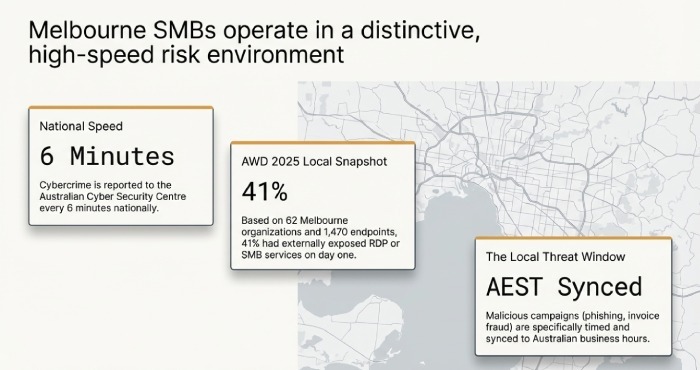
Melbourne SMBs operate in a distinctive risk environment: a high uptake of cloud services, hybrid work across AEST time zones, and widespread reliance on the NBN and mobile broadband for connectivity. The Australian Cyber Security Centre reported cybercrime is reported every six minutes nationally, and our local market regularly sees targeted phishing scams, invoice fraud, and credential theft campaigns aligned to Australian business hours. For small IT teams, this means early, structured detection is your best defence.
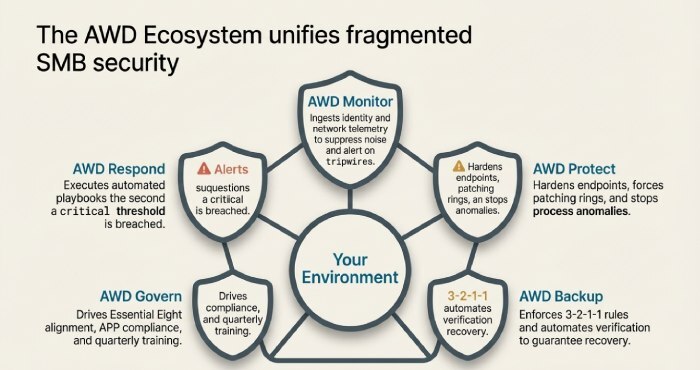
To turn “warnings” into “action,” you need two parallel tracks: first, instrument your environment to collect the right signals (network, identity, endpoint, cloud, backup), and second, set practical thresholds and automated responses you can maintain with a small team. Throughout this guide, we’ll show how AWD’s Melbourne-focused managed platform covering monitoring (AWD Monitor), endpoint protection (AWD Protect), backup and recovery (AWD Backup), governance and training (AWD Govern), and automated response (AWD Respond)—plugs into each risk area so you can see, decide, and act faster.
1) What to Monitor: Technical Metrics and Logs That Reveal Early Compromise
Small businesses don’t need every log just the right ones, tuned to small-team capacity.
Identity and Access Signals (High Priority)
- Failed logins and lockouts: Repeated failures can indicate credential stuffing.
- Threshold: More than 10 failed logins for a single user in 5 minutes or from >3 countries in 24 hours.
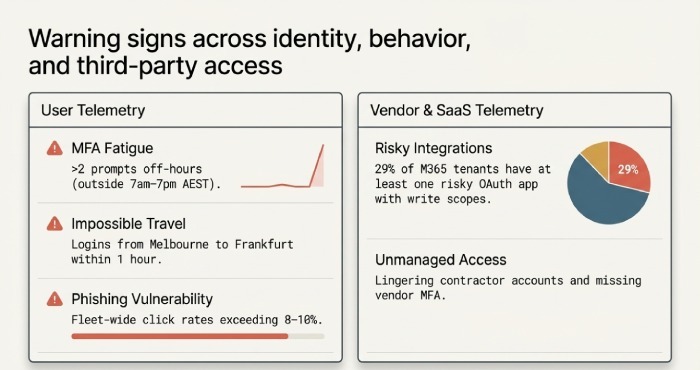
- Add “impossible travel” detections (e.g., Melbourne to Frankfurt within 1 hour).
- MFA fatigue: Multiple push prompts in short windows.
- Threshold: >2 multi-factor authentication (MFA) prompts for the same user in 24 hours outside 7am–7pm AEST.
- Privilege changes: New global admin, mailbox forwarding rules, or OAuth consent grants.
- Threshold: Any privileged role assignment or OAuth app with Mail.ReadWrite, Files.ReadWrite, or Directory.ReadWrite.All.
Network and Perimeter Indicators
- Egress anomalies: Large or unexpected outbound transfers, especially to unrecognised ASNs.
- Threshold: >500 MB/hour from a single endpoint to non-approved destinations; >50 DNS lookups/hour to newly registered domains.
- Beaconing: Regular, small, periodic connections (e.g., every 60 seconds) to a single IP.
- Threshold: 30+ identical periodic connections in 30 minutes to non-allowlisted IP/C2 patterns.
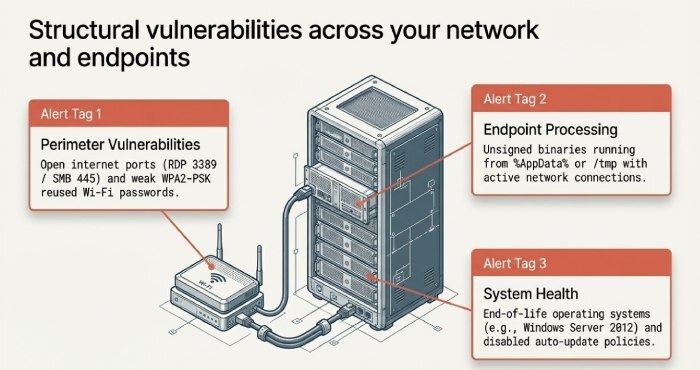
- Firewall denies and opens ports: Spikes in blocked traffic; externally accessible RDP/SMB.
- Threshold: Any open RDP (3389) or SMB (445) to the internet; >1,000 denies/hour sustained 2+ hours.
Endpoint and Server Telemetry
- CPU/disk spikes off-hours; suspicious scheduled tasks or services.
- Threshold: >80% CPU sustained >10 minutes between 10pm–5am AEST; creation of new scheduled task or new local admin.
- Process anomalies: Office spawning PowerShell; unsigned binaries running from temp folders.
- Threshold: Any Office → script engine chain; unsigned EXE from %AppData% or /tmp with network connections.
System and Backup Health
- Event logs: LSASS access attempts; service failures; disk errors.
- Backup logs: Missed or failing jobs; replica lag.
Implementation tip for small teams:
- Centralise logs via a lightweight Security information and event management(SIEM) (e.g., Wazuh/Elastic for on-prem; Microsoft Sentinel if you’re on M365 Business Premium) with 15–25 core rules.
- Use log retention tiers: 30 days hot, 90 days warm, 365 days cold for critical sources.
- Automate first responses (quarantine user/host, block IP, revoke OAuth tokens).
2) Affordable Tools and Services That Fit Melbourne SMBs
You don’t need enterprise budgets to gain enterprise-grade visibility.
Proven, Budget-Friendly Stack
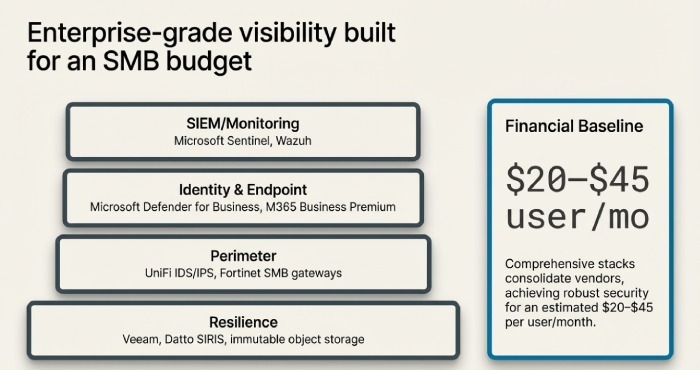
- Endpoint Protection/EDR: Microsoft Defender for Business (included in M365 Business Premium), Bitdefender GravityZone, Sophos Intercept X.
- SIEM/Monitoring: Microsoft Sentinel (pay-as-you-go), Wazuh, Elastic Security, Graylog.
- RMM/Patching: NinjaOne, Atera, Datto RMM, Microsoft Intune.
- Perimeter: Ubiquiti UniFi with IDS/IPS enabled, Fortinet FortiGate 40F/60F for SMB.
- Backup: Veeam (VMs/servers), Acronis Cyber Protect, Datto SIRIS for BCDR, Backblaze B2/Wasabi for cloud object storage.
Recommended alerting rules:
- Identity: Impossible travel, risky OAuth consent, mailbox auto-forward to external domains.
- Endpoint: Suspicious parent/child process chains; persistence via RunKeys/Tasks.
- Network: Public exposure of RDP/SMB; outbound to known C2; DNS to DGA-like domains.
- Backup: Two consecutive failures; last successful backup older than RPO; immutable copy missing.
Maintenance practices:
- Weekly rule tuning; monthly “false positive kill” session; quarterly tabletop for incident response; patch cadence tied to Patch Tuesday + 14 days service level agreement (SLA).
3) Outdated Software and Patch Management: How Risk Shows Up and How to Fix It
Warning signs:
- “End of life” OS (Windows Server 2012/2012 R2, old Android/iOS), unpatched Fortinet/Exchange/VPN firmware, desktop browsers >2 versions behind, disabled auto-update policies.
- Users delaying reboots for weeks; patch failures repeating across the fleet; legacy apps pinning old Java/.NET.
Practical patching process for small teams:
- Asset inventory first: tag systems by criticality (Tier 1–3).
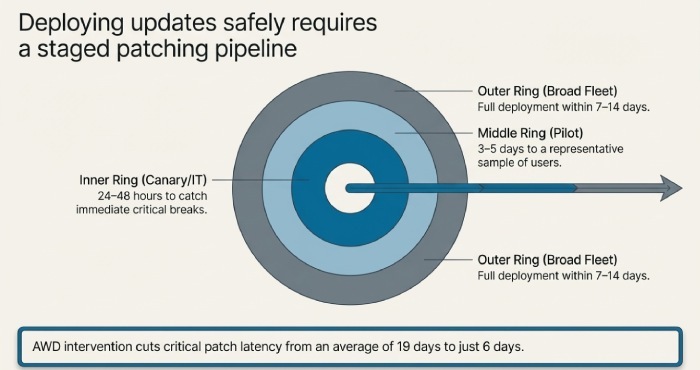
- Create rings: IT/canary (24–48 hours), pilot (3–5 days), broad (7–14 days).
- SLAs: Critical patches deployed within 7 days; high within 14; firmware quarterly; browsers weekly auto-update.
- Automate with Intune/NinjaOne/Datto RMM + Ninite Pro/Patch My PC; enforce reboot windows (e.g., 7–9pm) with grace prompts.
- Report: Weekly compliance %; flag any device >14 days behind as critical.
4) Network Configuration Pitfalls and Step-by-Step Hardening
Common issues:
- Open ports to the internet (RDP/SMB, unmanaged NAS), weak Wi-Fi (WPA/WPA2-PSK reused), flat LANs with no segmentation, misconfigured virtual private network(VPN) lacking MFA or split-tunnel controls.
Remediation steps:
- Map exposure: Run external scans (Shodan/Censys check + Nmap from outside).
- Close/limit: Eliminate public RDP/SMB; publish via reverse proxy/Zero Trust gateways; geoblock where feasible.
- Wi-Fi hygiene: Move to WPA3-Enterprise (or at minimum WPA2-Enterprise) with RADIUS; rotate PSKs if still using PSK; isolate guest SSIDs to internet-only VLAN.
- Segmentation: Create VLANs (Workstations, Servers, IoT, Guest); block lateral movement; allow list only required flows.
- VPN hardening: Enforce MFA; restrict to device-compliant endpoints; prefer modern protocols (WireGuard/IKEv2); audit split tunnelling.
- IDS/IPS: Enable on UniFi/Fortinet; use balanced rulesets to avoid performance hits.
5) Backup Red Flags, Verification, and Realistic RTO/RPO for Melbourne SMBs
Warning signs:
- Backups succeed “on paper” but restores haven’t been tested in 6–12 months.
- Single backup location (on the same NAS or domain); no immutability; missing 3-2-1 rule.
- RDP-exposed backup servers; backup jobs failing on key databases due to VSS errors.
Recommended policy:
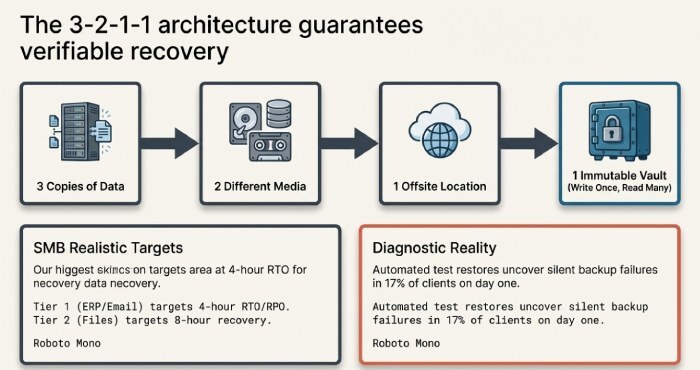
- 3-2-1-1: 3 copies, 2 media, 1 offsite, 1 immutable (Object Lock/WORM).
- Verification: Automated restore tests weekly for critical data; monthly full VM boots in an isolated sandbox; screenshot verification reports.
- Retention: 30 days daily, 12 months monthlies, 7 years yearlies for finance/legal.
- RTO/RPO targets realistic for SMB:
- Tier 1 (ERP, email): RTO 4 hours; RPO 4 hours (use replication/CDP).
- Tier 2 (file shares): RTO 8 hours; RPO 12–24 hours.
- Tier 3 (archives): RTO 24–72 hours; RPO 48–72 hours.
6) Human Risk: Behaviours and Social-Engineering Indicators
Warning signs:
- High phishing click rates (>8–10%), frequent password reset requests, employees connecting personal devices, creation of suspicious mailbox rules (auto-forward to external accounts).
- USB device usage spikes; repeated requests for exceptions to MFA.
Mitigations that work:
- Mandatory MFA + Conditional Access; device compliance checks for access.
- Email authentication: SPF, DKIM, DMARC at p=quarantine/enforce; block auto-forward externally.
- Role-based access control; remove local admin rights; Just-In-Time elevation for IT.
- Training: Quarterly 10-minute micro-modules + monthly phishing simulations; target repeat offenders with 1:1 coaching.
7) Third-Party, SaaS Integrations, and Shadow IT
Warning signs:
- Unknown OAuth apps granted high privileges in M365/Google; unmanaged contractor accounts lingering; data synced to personal Dropbox/Google Drive.
- Vendors without MFA, no right-to-audit, or unclear breach notification clauses.
Vendor and SaaS controls:
- Least privilege: Use SCIM/Just-In-Time provisioning; auto-deprovision on HR events.
- App governance: Require admin approval for OAuth; review scopes monthly; block risky consumer apps.
- Contracts: Security schedule mandating MFA, breach notification “as soon as practicable,” Australian data residency where feasible, and annual pen-test attestation for critical vendors.
8) Distinguishing Active Breach from Benign Anomalies
Patterns suggesting an active breach:
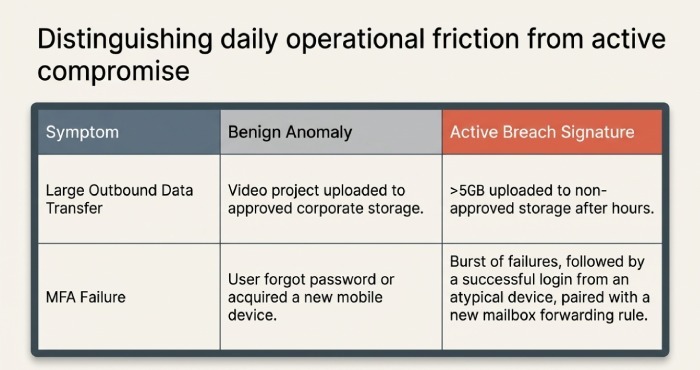
- Data exfiltration: Sudden >5 GB upload to non-approved storage in a day; unusual after-hours transfer bursts.
- C2 beaconing: Low-and-slow periodic traffic with domain flux; DNS to newly registered TLDs.
- Identity hand-offs: Successful MFA from atypical device following a failed burst; mailbox rule + OAuth grant combo.
- Endpoint persistence: New autoruns paired with credential dumping attempts (LSASS reads).
Small-team thresholds and automated actions:
- Tripwire thresholds:
- 500 MB/hour to non-allowlisted destinations.
- 20 failed logins in 10 minutes or >3 geo regions in 24 hours.
- New privileged role outside 7am–7pm AEST.
- Two consecutive backup failures for Tier 1 workloads.
- Automated responses:
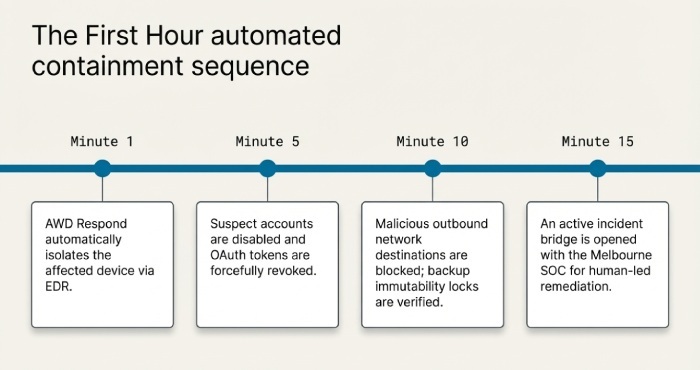
- Quarantine device via Endpoint Detection and Response (EDR); block egress to suspicious ASN; revoke OAuth tokens; disable user and require reset; snapshot/lock backups; open a P1 ticket with on-call.
9) On-Prem vs Cloud: Resilience, Security, and Risk Signals
Risk indicators you’re outgrowing on-prem:
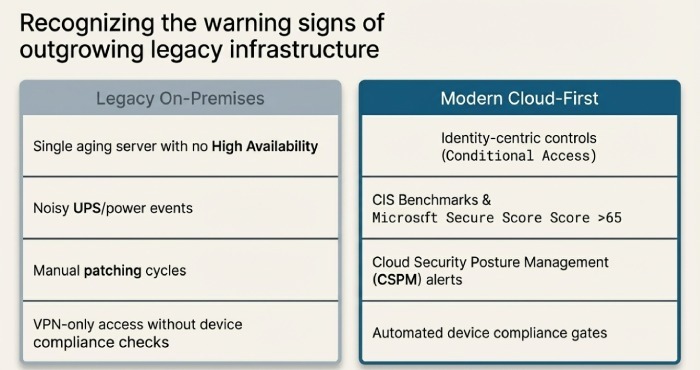
- Single ageing server (no HA), noisy UPS/power events, unmonitored ESXi, manual patching cycles, VPN-only remote access without device checks.
- Cloud sprawl without governance: public S3/Blob containers, anonymous shares, low Secure Score.
Controls to de-risk:
- Favour identity-centric, cloud-first for email/collab (M365/Google) with Conditional Access and device compliance.
- For on-prem apps, add reverse proxy/Zero Trust access and enable MFA.
- Use CIS Benchmarks and Microsoft Secure Score >65; deploy Cloud Security Posture Management (CSPM) for misconfiguration alerts; encrypt data at rest and in transit; key management with rotation.
10) Compliance Gaps in Australia: Practical Fixes and Timelines
Common warning signs:
- No incident response plan; no cyber insurance; untracked data lifecycles; non-compliance with Australian Privacy Principles (APPs); missing Notifiable Data Breach (NDB) procedures.
Practical steps:
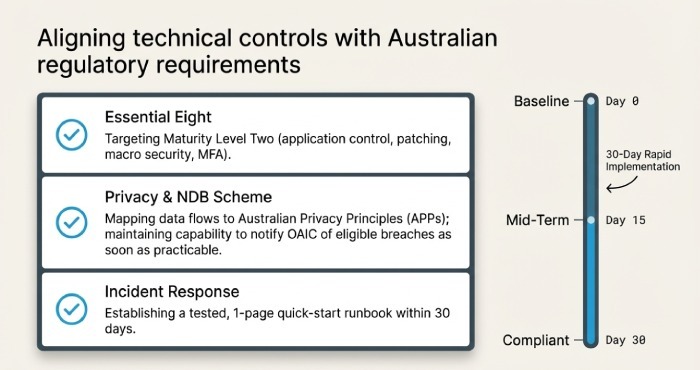
- Incident Response: Draft and test a 1-page quick-start runbook in 30 days; tabletop quarterly; include OAIC notification steps.
- Privacy: Map personal information flows; apply data minimisation and access controls; document privacy policy; ensure vendor contracts align to APPs.
- Essential Eight: Aim for Maturity Level Two for application control, patching, macros, user app hardening, MFA, backups, application hardening, and admin restrictions.
- Cyber Insurance: Complete control mapping, strengthen MFA/EDR/backup immutability to meet underwriting.
Quick Reference: Signs, Checks, and AWD Actions
| Warning Sign | Quick Check | AWD Action |
| Spikes in failed logins | Auth logs: >10 in 5 mins | Auto-lock account; reset; block source IP |
| Large outbound data | Firewall/EDR: >500 MB/hr | Quarantine host; block destination; alert |
| Unpatched systems | Patch report: >14 days overdue | Force ring update; JIT hardening until patched |
| Backup risk | Last success >RPO; 2 fails | Run test restore; escalate; lock immutability |
| New OAuth app | M365 consent event | Revoke token; require admin review |
| Weak Wi-Fi | PSK reused; WPA2-PSK | Migrate to WPA3-Enterprise; isolate guests |
Original Data from Melbourne SMBs
AWD 2025 Melbourne SMB Snapshot (n=62 organisations, 1,470 endpoints):
- 41% had at least one externally exposed RDP or SMB service on first scan.
- 29% of Microsoft 365 tenants had at least one risky OAuth app with write scopes.
- Median patch latency for critical updates was 19 days before onboarding AWD; 6 days after 90 days on AWD Patch.
- Automated test restores uncovered silent backup failures in 17% of clients on day one.
FAQs
How often should we review alerts and tune rules?
- Weekly for triage and tuning, monthly for a deeper review, and quarterly to re-baseline thresholds. AWD Monitor automates noise suppression and suggests rule adjustments based on your environment.
What’s a realistic starting budget for SMB security tooling in Melbourne?
- For 25–75 users, $20–$45 per user/month can cover EDR, email security, backup, and monitoring if you leverage M365 Business Premium. AWD packages align to these bands and consolidate vendors to reduce overlap.
Are we legally allowed to monitor employee activity like logs and email security events?
- Yes, when done proportionately and with clear policy/consent consistent with Australian workplace surveillance laws and privacy obligations. AWD Govern provides policy templates and ensures monitoring aligns with APPs.
What should we do in the first hour if we see several warning signs at once?
- Contain first: isolate affected devices, disable suspected accounts, revoke OAuth tokens, block malicious destinations, and protect backups (immutability/snapshots). AWD Respond executes these steps automatically and opens an incident bridge with our Melbourne security operations center (SOC).
How fast must we notify under the Notifiable Data Breach scheme?
- “As soon as practicable” after becoming aware that an eligible data breach has occurred. AWD Govern’s IR workflow includes assessment checklists and OAIC notification templates to accelerate compliance.
Conclusion: Turn Warning Signs into Measurable Security Outcomes with AWD
Your Melbourne small business is at risk when you see unusual network/authentication activity, outdated systems, weak network configurations, backup gaps, risky user behaviour, unmanaged third parties, breach-like endpoint/cloud patterns, ageing on-prem constraints, and compliance shortfalls but these signals can be harnessed into decisive action with the right tooling, thresholds, and playbooks. AWD brings this together for SMBs: AWD Monitor collects the right signals, AWD Protect stops endpoint threats, AWD Backup guarantees verifiable recoveries, AWD Govern lifts you to Essential Eight-aligned maturity with APPs compliance, and AWD Respond automates first-hour containment. If you’re seeing any of the warning signs above—or if you want a Melbourne-specific baseline assessment AWD can deploy in days, cut alert noise by half within a month, and reduce patch latency and phishing risk measurably in your first quarter.