
The top features Melbourne organisations should prioritise in managed IT solutions are Essential Eight–aligned security (EDR/MDR, next-gen firewalls, threat hunting), sovereign backup/DR with tested RPO/RTO, right-fit managed cloud (public/private/hybrid) with low-latency Melbourne regions, seamless SaaS integration (Microsoft 365, Xero, MYOB), measurable SLAs/KPIs and transparent reporting, resilient network/SD-WAN with carrier diversity, proven migration playbooks, industry-specific compliance templates, value-transparent pricing/TCO, and robust governance/change/onboarding delivered end-to-end by AWD.
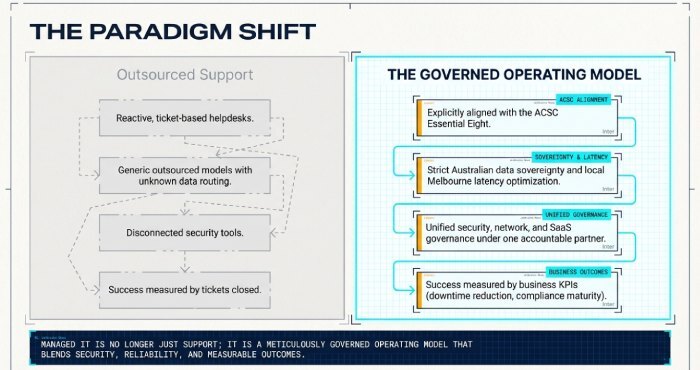
Managed IT today is not just outsourced support; it’s a governed operating model that blends security, reliability, flexibility and measurable outcomes under one accountable partner. In Melbourne, that operating model must explicitly align with the ACSC Essential Eight, Australian data sovereignty rules, and the realities of local latency and carrier diversity. It also must integrate cleanly with the SaaS applications your teams rely on daily while supporting hybrid work across metro and regional Victoria.
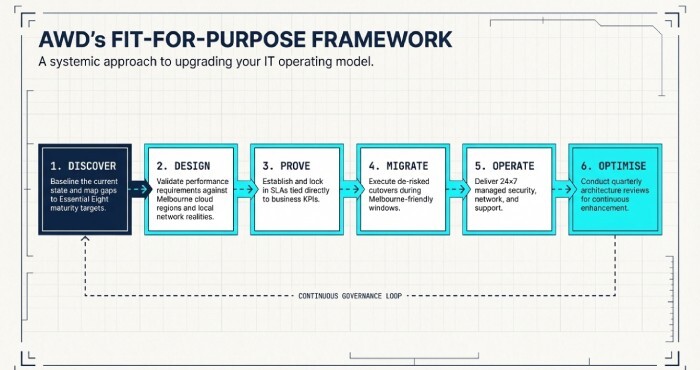
AWD’s Melbourne-first approach frames these requirements into a practical blueprint: secure by default, local by design, and optimised for business productivity. Using AWD’s Fit-for-Purpose Framework Discover, Design, Prove, Migrate, Operate, Optimise we baseline your current state, map gaps to Essential Eight maturity targets, validate performance against Melbourne cloud regions, and lock in SLAs tied to business KPIs, not just tickets closed.
Essential Eight–aligned cybersecurity that’s built for Melbourne
A resilient Melbourne organisation starts with managed cybersecurity controls mapped to the ACSC Essential Eight and sector regulations.
Endpoint, EDR/MDR and continuous threat hunting
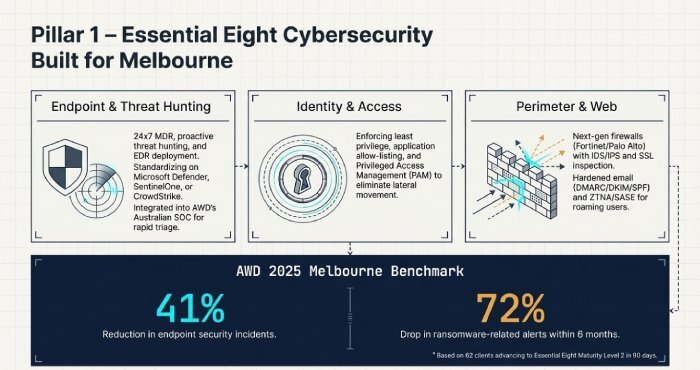
- Deploy EDR across Windows, macOS and mobile with 24×7 MDR and proactive threat hunting. AWD commonly standardises on Microsoft Defender for Endpoint, SentinelOne or CrowdStrike integrated into AWD’s Australian SOC for rapid triage and containment.
- Enforce least privilege, application allow-listing, and privileged access management (PAM) to reduce lateral movement.
- AWD tie-in: AWD’s Essential Eight Accelerator implements baseline controls to reach Maturity Level 2 in 90 days, including EDR, app control, OS/app patching and MFA, with dashboards mapped to each Essential Eight strategy.
Next-gen firewalls, Zero Trust and email/web controls
- Use next-gen firewalls (e.g., Fortinet/Palo Alto) with IDS/IPS, SSL inspection, and geo/IP reputation blocking; pair with ZTNA/SASE for roaming users.
- Harden email security with DMARC/DKIM/SPF, sandboxing and impersonation protection; apply web filtering with safe search and anti-malvertising.
- AWD tie-in: AWD’s Managed Perimeter includes policy-as-code templates for Melbourne offices and remote workers, plus conditional access in Microsoft Entra for device posture and Multifactor authentication (MFA) .
Compliance mapping and Melbourne requirements
- Align to the ACSC Essential Eight (application control, patching, macro settings, user app hardening, restrict admin privileges, patch OS, MFA, regular backups), targeting Maturity Level 2 minimum for most SMEs.
- Address local rules: Privacy Act 1988 and the Notifiable Data Breach (NDB) scheme, sector frameworks like APRA CPS 234 (finance), VPDSF (Vic public sector), and My Health Records Act (healthcare).
- AWD tie-in: AWD maintains control matrices that map deployed tools and policies to Essential Eight and sector controls, included in monthly executive risk reports.
Original data (AWD 2025 Melbourne benchmark, 62 clients): organisations advancing to Essential Eight Maturity Level 2 with AWD’s stack saw a 41% reduction in endpoint security incidents and a 72% drop in ransomware-related alerts within six months.
Backup, disaster recovery and business continuity you can test and trust
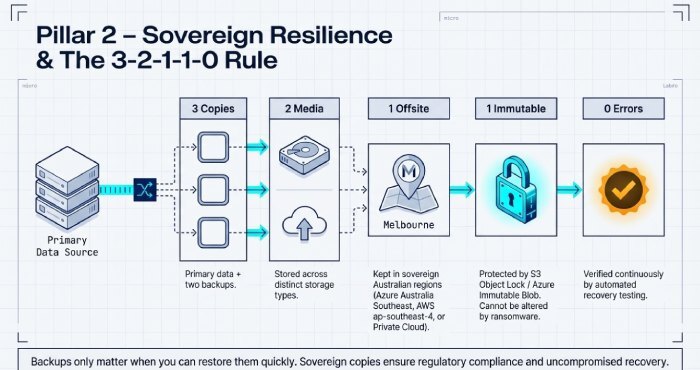
Backups only matter when you can restore them quickly, with sovereign copies and immutability.
RPO/RTO targets, data residency and the 3-2-1-1-0 rule
- Set RPO/RTO by workload
Tier 1 (ERP/EMR/payments): RPO 5–15 minutes, RTO <60 minutes- Tier 2 (file/SharePoint/line-of-business): RPO 1–4 hours, RTO <4 hours
- Tier 3 (archives/dev/test): RPO 24 hours, RTO <24 hours
- Enforce 3-2-1-1-0: 3 copies, 2 media, 1 offsite, 1 immutable, 0 errors verified by automated recovery testing.
- Keep offsite copies in Australian regions (Azure Australia Southeast – Melbourne; AWS ap-southeast-4 – Melbourne; or ISO-27001 private clouds in VIC/NSW).
- AWD tie-in: AWD’s Backup-as-a-Service (BaaS) uses immutable storage (e.g., S3 Object Lock/Azure Immutable Blob) and cross-region replication (Melbourne↔Sydney) to meet sovereignty and survivability requirements.
Failover testing cadence and documentation
- Run quarterly DR tests for Tier 1, semi-annual for Tier 2; document step-by-step runbooks and capture actual RTO/RPO achieved.
- Validate application-level recovery (not just VMs): database consistency checks, application health, user access.
Cloud and network architecture optimised for Melbourne latency and resilience
Choosing public, private or hybrid cloud is a workload decision; network underlays and SD-WAN determine user experience.
Managed cloud trade-offs and a Melbourne-centric decision path
- Performance and latency
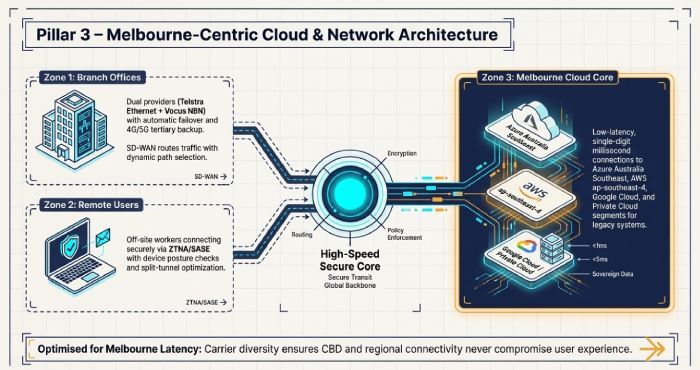
- Azure Australia Southeast (Melbourne), AWS ap-southeast-4 (Melbourne), and Google Cloud australia-southeast2 (Melbourne) offer single-digit ms latencies metro-wide.
- Cost and compliance
- Public cloud is opex-friendly and fast to scale; private cloud can win on steady-state cost predictability and customised compliance.
- Hybrid reality
- Keep latency-sensitive or legacy systems in a Melbourne private cloud; burst or modernise to public cloud as you refactor.
- AWD tie-in: AWD’s Cloud Advisory runs a workload-by-workload fit analysis, modelling cost, latency and control requirements, then implements landing zones with policy guardrails.
Network design: NBN/Ethernet redundancy, SD-WAN, and carrier diversity
Branch/office:
- Dual providers (e.g., Telstra Ethernet + Vocus NBN Enterprise Ethernet) with automatic failover and 4G/5G tertiary.
- SD-WAN for dynamic path selection, QoS for Microsoft Teams/Zoom, and integrated security.
Remote users:
- ZTNA/SASE with device posture checks; split-tunnel optimisation for Microsoft 365 and video.
Seamless SaaS integration and data protection for Microsoft 365, Xero, MYOB and more
Your managed IT partner must integrate and secure the SaaS estate you already run.
Identity, SSO and device trust
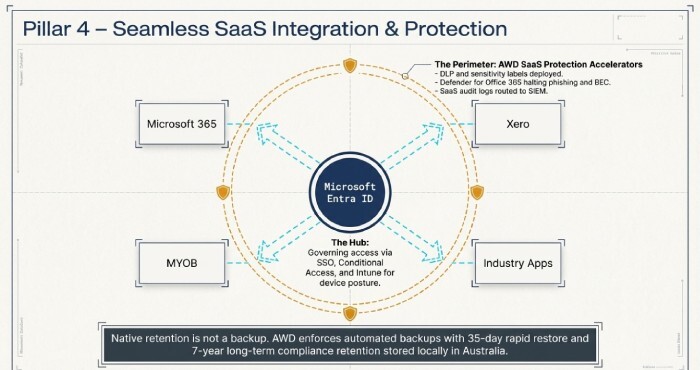
- Centralise identity in Microsoft Entra ID with SSO to Microsoft 365, Xero, MYOB and industry apps; enforce Conditional Access and MFA.
- Use Intune for Windows/macOS/iOS/Android posture, app protection and encryption at scale.
- AWD tie-in: AWD’s SaaS Integration Accelerators include 40+ prebuilt playbooks (e.g., SCIM provisioning, conditional access baselines, Intune compliance policies) tailored for Melbourne organisations.
Data protection, auditability and SaaS backup
- Implement DLP (data loss prevention) and sensitivity labels in Microsoft 365; enable Defender for Office 365 for phishing and BEC.
- Route SaaS audit logs to a SIEM; apply CASB policies for risky OAuth apps and impossible travel.
- Back up SaaS: Microsoft 365 (Exchange/SharePoint/OneDrive/Teams), Xero (daily exports), MYOB (scheduled snapshots).
- AWD tie-in: AWD’s SaaS Protection bundles include policy sets for Melbourne privacy obligations and automated backups with 35-day rapid restore and 7-year long-term retention options in Australian storage.
Accountability, migration, industry tailoring, pricing and governance
Demand visibility, plan migrations pragmatically, tailor to your sector, pay for value, and govern change disciplinedly.
SLAs, KPIs and reporting that matter
Core SLAs:
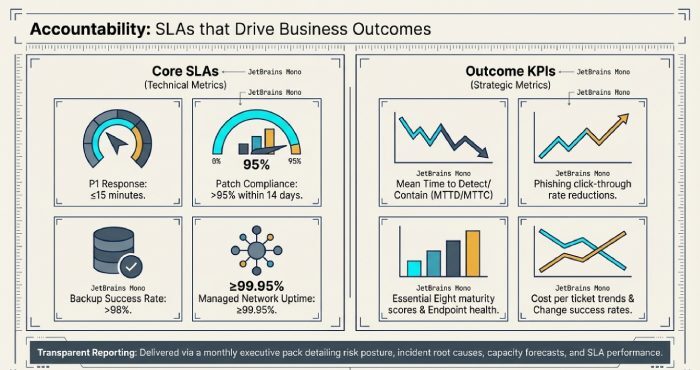
- P1 response: ≤15 minutes, restoration within business RTOs
- Patch compliance >95% within 14 days
- Backup success >98%
- Monthly uptime ≥99.95% for managed network
Outcome KPIs:
- Mean time to detect/contain (MTTD/MTTC)
- Phishing click-through rate
- Essential Eight maturity score
- Endpoint health score
- Cost per ticket trend
- Change success rate
Reporting:
- Monthly executive pack with risk posture, service level agreement (SLA) performance, incidents by root cause, cost and capacity forecasts, and service credits where targets aren’t met.
Migration challenges and how to de-risk them
Data transfer and cutover:
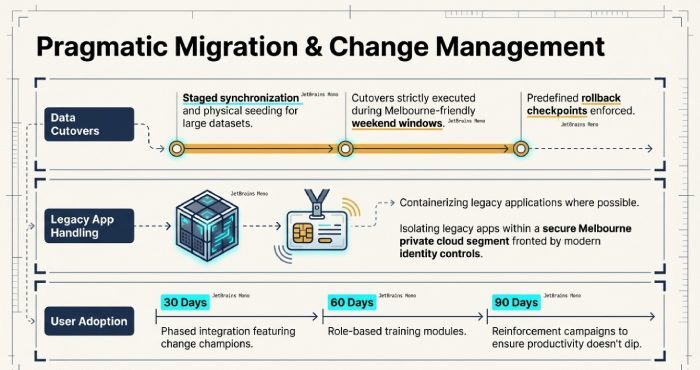
- Use staged synchronisation and seeding (e.g., drives) for large datasets; cut over during Melbourne-friendly windows with rollback checkpoints.
Legacy apps:
- Containerise where possible; otherwise host in a Melbourne private cloud segment with modern identity front-ends.
User adoption:
- Change champions, role-based training, and 30/60/90-day reinforcement campaigns.
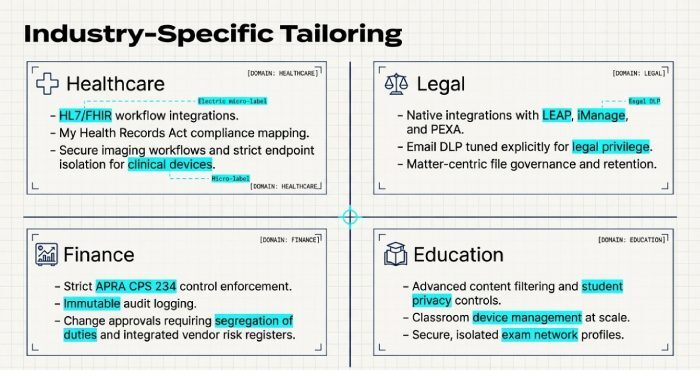
Industry-specific tailoring (healthcare, legal, finance, education)
Healthcare:
- HL7/FHIR integration, My Health Records compliance, secure imaging workflows; endpoint isolation for clinical devices.
Legal:
- Integrations with LEAP/iManage/PEXA, email DLP tuned for privilege, matter-centric file governance.
Finance:
- APRA CPS 234 controls, immutable logs, change approvals with segregation of duties, vendor risk registers.
Education:
- Content filtering, student privacy controls, classroom device management, exam network profiles.
Pricing models and total cost of ownership (TCO)
Models:
- Per-user subscription for support/security
- Tiered bundles (Essentials/Enhanced/Elite)
- Fixed-fee projects for migrations
- Optional usage-based cloud costs
How to evaluate:
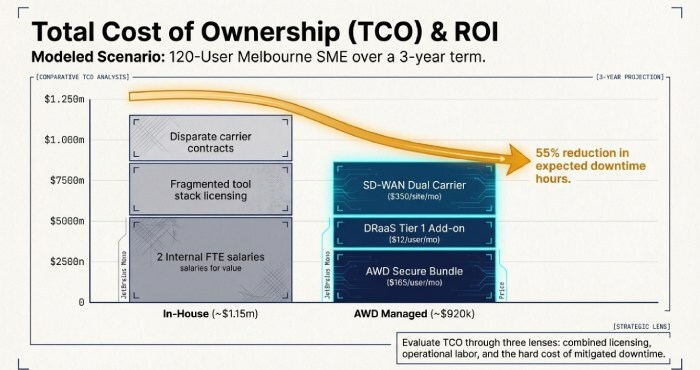
- 3-year TCO (licences + operations + risk reduction), service credits, exit costs, and internal headcount avoided.
Melbourne SME example (120 users):
- Managed IT Secure bundle: $165/user/month
- DRaaS Tier 1 add-on: $12/user/month
- SD-WAN per site: $350/month (dual carrier)
Estimated 3-year TCO with AWD: ~$920k vs. in-house ~$1.15m (2 FTEs + tool stack + carrier contracts), plus quantified risk reduction (expected downtime hours cut by ~55%).
Operational governance, change management and onboarding
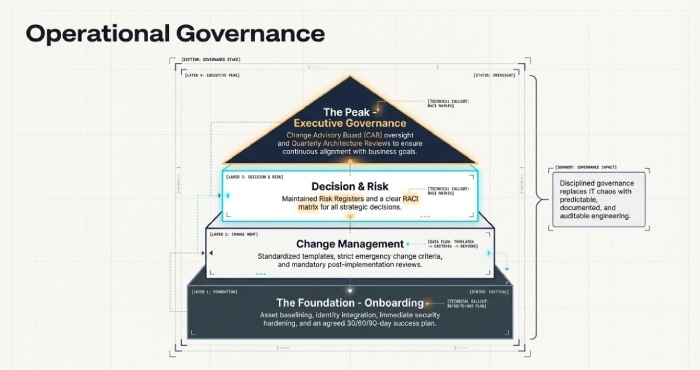
Governance:
- RACI for decisions
- CAB for changes
- Risk register
- Quarterly architecture reviews
Change:
- Standardised templates
- Emergency change criteria
- Post-implementation reviews
Onboarding:
- Asset baseline
- Identity integration
- Security hardening
- Knowledge transfer
- Agreed 30/60/90-day success plan
FAQs
How do I know if we’ve actually reached Essential Eight Maturity Level 2?
AWD conducts a formal control assessment, produces evidence (policies, technical screenshots, logs), maps them to the Essential Eight, and provides an attestation report with any residual gaps and remediation timelines.
Do we really need a separate SaaS backup for Microsoft 365 and Xero?
Yes, native retention isn’t a full backup. AWD’s SaaS backups provide point-in-time restores (accidental deletion/ransomware), long-term retention for compliance, and cross-tenant recovery options all stored in Australian regions.
Can AWD work with our existing vendors and tools?
Absolutely. AWD integrates with existing Endpoint Detection and Response (EDR), firewalls, SIEM and ITSM tools, or provides a curated stack. We follow interoperability patterns (API/webhook/identity federation) and document runbooks so hand-offs are seamless.
What if our internet goes down across the CBD?
AWD designs for carrier diversity (e.g., Telstra + Vocus) with SD-WAN, plus 4G/5G failover. Critical SaaS apps are prioritised, and remote workers can connect via ZTNA from unaffected links.
Conclusion: Choose features that protect outcomes—and a partner that proves them
For Melbourne organisations, the must-have features in managed IT are clear: Essential Eight–aligned cybersecurity, sovereign and tested backup/DR, Melbourne-optimised cloud and networks, seamless SaaS integration, accountable SLAs/KPIs, pragmatic migration, sector-specific controls, value-transparent pricing, and disciplined governance.
AWD ties these features to measurable business outcomes with local expertise, Australian data residency, and a proven framework. If you’re ready to benchmark your current state against these features and see an AWD TCO and outcomes model for your Melbourne environment, AWD can run a no-cost Fit-for-Purpose assessment and present a 90-day execution plan.