
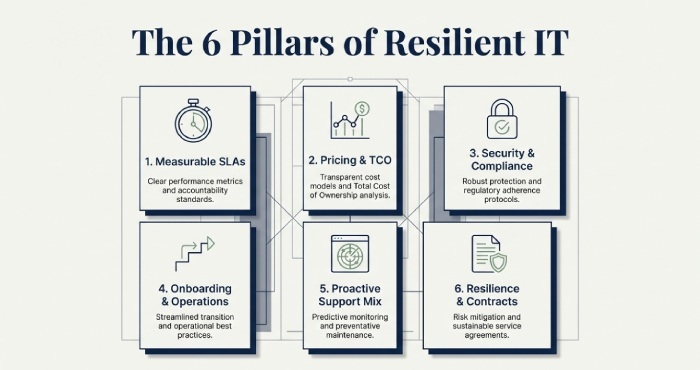
The best criteria for choosing an IT support provider for a small business include clear, enforceable SLAs with defined response and resolution targets; transparent pricing and total cost of ownership; strong cybersecurity controls with relevant compliance certifications; structured onboarding and documentation; proven proactive monitoring and patching rather than reactive support; an appropriately balanced mix of remote and on-site assistance with defined escalation pathways; demonstrated expertise in your technology stack supported by case studies and certifications; robust disaster recovery, backup, and business continuity planning (with RTO/RPO targets); and contract terms that protect data ownership, include fair exit and transition support, and avoid vendor lock-in.
Selecting an IT support partner is ultimately a risk and value decision; you are entrusting core business operations such as availability, security, and productivity to a third party. It is therefore critical to assess both their operational maturity and how well they align with your organisation’s specific needs.
The right provider combines measurable service performance with infrastructure decisions that reduce incident frequency and business impact, while aligning budget to outcomes rather than activity.
This article provides a practical, criteria-driven evaluation framework that small businesses can use to shortlist and select a provider illustrated with realistic data points, TCO models, and case studies and demonstrates how AWD, a managed IT platform and service provider, addresses each criterion through auditable service-level agreements(SLAs), proactive operations, security certifications, transparent pricing, and safe exit protections.
SLAs, Pricing, and Measurable Value
SLA essentials small businesses should require
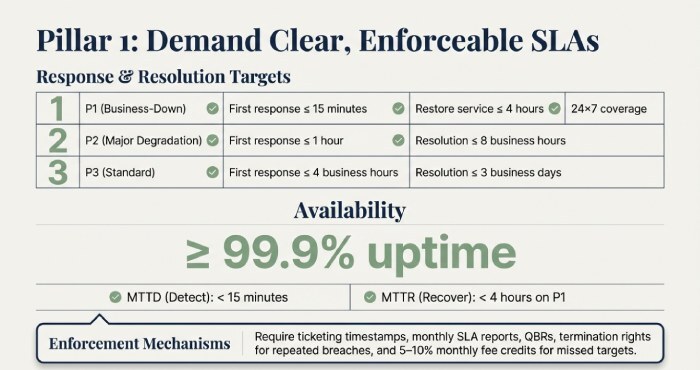
- Response and resolution targets: Define time to first response (TTR) and time to resolve (TTRs) by priority:
- P1 (business-down): first response ≤ 15 minutes, restore service ≤ 4 hours; 24×7 coverage
- P2 (major degradation): first response ≤ 1 hour, resolution ≤ 8 business hours
- P3 (standard): first response ≤ 4 business hours, resolution ≤ 3 business days
- Availability and performance: ≥ 99.9% uptime for critical services the provider hosts or manages, with:
- MTTD (Mean Time to Detect): < 15 minutes
- MTTR (Mean Time to Recover): < 4 hours on P1 incidents
- Measurement and enforcement:
Ticketing system timestamps for response and resolution, RMM or monitoring logs for uptime, monthly SLA reports, quarterly business reviews (QBRs), and service credits (e.g. 5–10% monthly fee credit for missed targets) plus termination rights for repeated breaches.
Pricing models compared by Total Cost of Ownership (TCO)
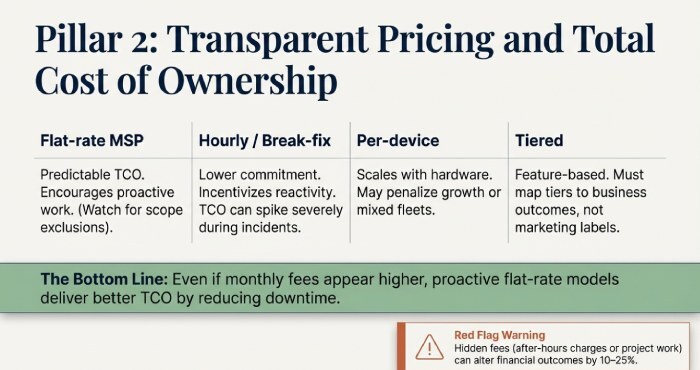
- Flat-rate MSP (per user or per device): Predictable, encourages proactive work. Watch for scope exclusions.
- Hourly / break-fix: Lower commitment but incentivises reactivity; total cost of ownership(TCO) can spike during incidents.
- Per-device: Scales with hardware; may penalise growth or mixed device fleets.
- Tiered (Bronze / Silver / Gold): Feature-based; map tiers to business outcomes rather than marketing labels.
Even where monthly fees appear higher, proactive flat-rate models typically deliver better TCO due to reduced downtime. Hidden fees such as after-hours charges or project-based work can alter outcomes by 10–25%, so pricing clarity is essential.
Security and Compliance That Fit Your Industry
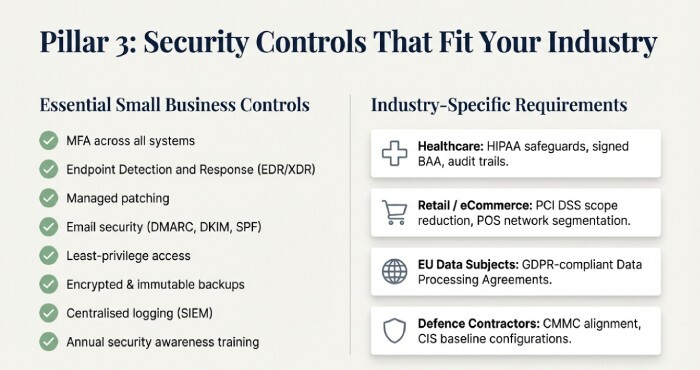
Essential controls for small businesses
- MFA across all systems
- Endpoint Detection and Response (EDR/XDR)
- Managed patching
- Email security (DMARC, DKIM, SPF)
- Least-privilege access controls
- Encrypted and immutable backups
- Centralised logging (SIEM)
- Annual security awareness training
Industry-specific requirements may include:
- Healthcare: HIPAA safeguards, signed BAA, audit trails
- Retail / eCommerce: PCI DSS scope reduction, POS network segmentation
- EU data subjects: GDPR-compliant Data Processing Agreements
- Defence contractors: CMMC alignment and CIS baseline configurations
Onboarding, Operations, and Proactive Support
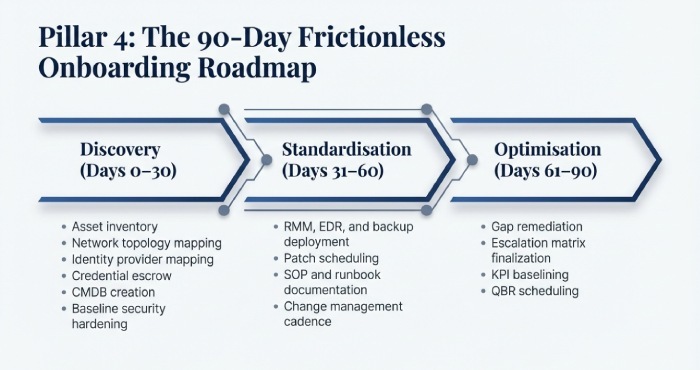
Frictionless onboarding and knowledge transfer
Discovery (Days 0–30):
- Asset inventory
- Network topology mapping
- Identity provider mapping
- Credential escrow
- Configuration Management Database(CMDB) creation
- Baseline security hardening
Standardisation (Days 31–60):
- RMM, EDR, and backup deployment
- Patch scheduling
- SOP and runbook documentation
- Change management cadence
Optimisation (Days 61–90):
- Gap remediation
- Escalation matrix finalisation
- key performance indicator baselining
- QBR scheduling
Proactive vs Reactive: How to Tell
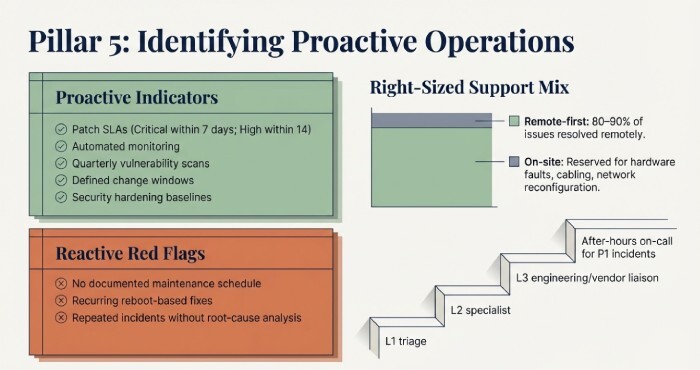
Proactive indicators:
- Patch SLAs (Critical within 7 days; High within 14)
- Automated monitoring
- Quarterly vulnerability scans
- Defined change windows
- Security hardening baselines
Reactive red flags:
- No documented maintenance schedule
- Recurring reboot-based fixes
- Repeated incidents without root-cause analysis
Right-sized support mix and escalation
- Remote-first: 80–90% of issues resolved remotely
- On-site support: Hardware faults, cabling, network reconfiguration
- Escalation model:
- L1 triage
- L2 specialist
- L3 engineering or vendor liaison
- After-hours on-call for P1 incidents
Resilience: Backup, Disaster Recovery, and Business Continuity
Backup and DR expectations
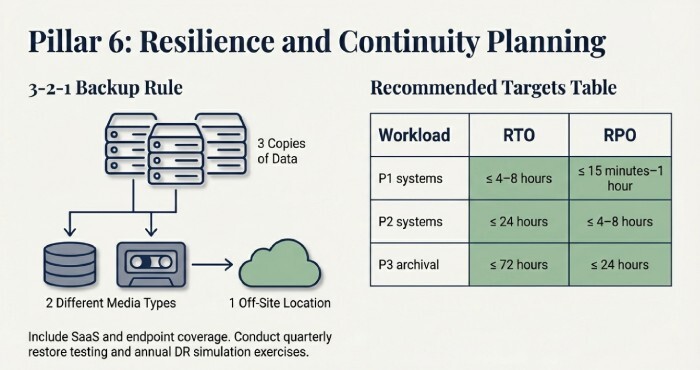
- Follow the 3-2-1 backup rule
- Include Software as a service(SaaS) and endpoint coverage
- Conduct quarterly restore testing
- Perform annual DR simulation exercises
Recommended small business targets
| Workload | RTO | RPO |
| P1 systems | ≤ 4–8 hours | ≤ 15 minutes–1 hour |
| P2 systems | ≤ 24 hours | ≤ 4–8 hours |
| P3 archival | ≤ 72 hours | ≤ 24 hours |
Contracts, Exit Protections, and Red Flags
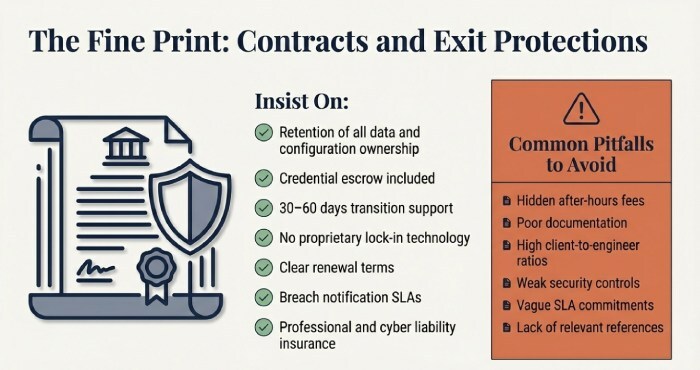
Contract terms to insist on
- You retain ownership of all data and configurations
- Credential escrow included
- 30–60 days transition support
- No proprietary lock-in technology
- Clear renewal terms
- Breach notification SLAs
- Professional and cyber liability insurance
Common pitfalls
- Hidden after-hours fees
- Poor documentation
- High client-to-engineer ratios
- Weak security controls
- Vague SLA commitments
- Lack of relevant references
Conclusion
For small businesses, the best IT support provider is one that proves performance through enforceable SLAs, reduces total cost via proactive operations, demonstrates strong security and compliance maturity, onboards with structured documentation, delivers an effective mix of remote and on-site support, and supports resilient continuity planning all backed by fair and portable contracts.
AWD was purpose-built around these criteria, including SLA Tracker with automatic credits, transparent flat-rate pricing, SOC 2 Type II and ISO 27001-backed AWD Shield, a 90-day Runbooks-led onboarding framework, ProactiveOps monitoring and patching, Hybrid Desk support, tested Continuity Cloud recovery, and a SafeExit clause that guarantees data ownership and transition assistance.
Whether you choose AWD or apply this framework to evaluate other providers, insist on measurable outcomes and ensure they can demonstrate capability before you sign.